
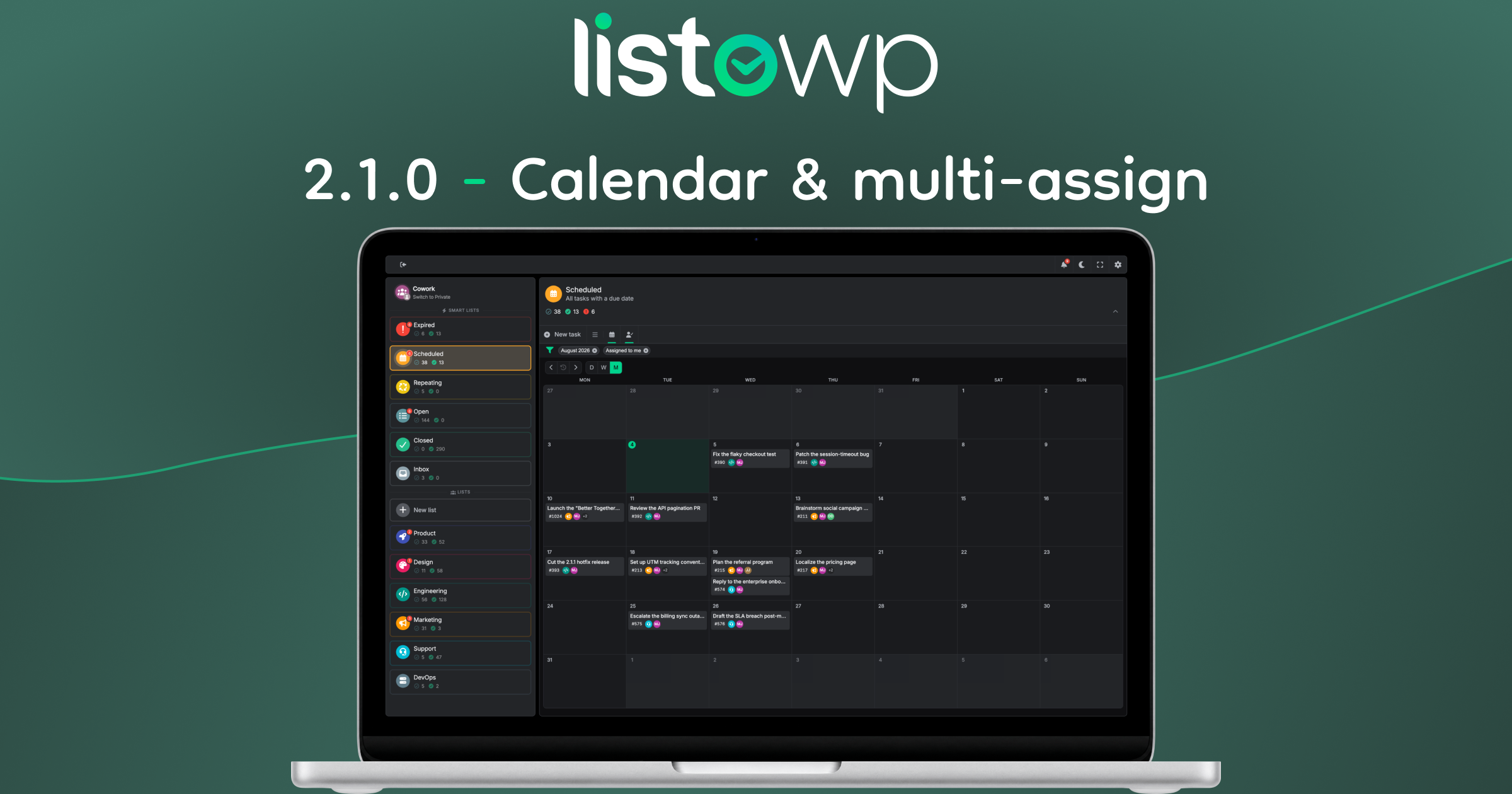
Taking Cowork to another level with Smart Lists, “assigned to me” filter, Calendar view, multi-member assignments and Guest role.
Calendar view
The Calendar isn’t a new kind of view – it’s more of a filter. Whatever you’re looking at, a private checklist, a shared board, or a Smart List like “Expired”, you can flip it into a Day, Week or Month calendar, see everything sitting on its date, and flip back.
That’s an important distinction. Whether a collection is a List or a Board is still an owner’s decision, and it’s shared by everyone on that list. The Calendar is different: it’s personal and momentary, just for you, right now – it never changes the list itself.
Each mode borrows a surface you already know. Month is the overview, and on smaller screens the cells collapse into dots you tap to open a day. Week borrows the Board – each weekday becomes a column, so the week reads like a plan. Day is simply your list for a single date. The 4 key toggles the lens, Shift+4 cycles the modes, the left & right arrow keys move you through time, and arrow-down key snaps back to today.
Because a calendar narrows what you can see, ListoWP now shows a strip of active filters above your tasks, naming the period you’re looking at, so a quiet week never gets mistaken for an empty list. One click clears it.
Just the ones that are yours
Cowork gets a new switch: Assigned to me. Flip it and every surface – list, board, calendar – narrows to the tasks that are actually on your plate. It composes with the calendar lens, so “what am I doing this week?” is two keystrokes. The counts in the sidebar deliberately stay team-wide, so you never lose sight of the bigger picture. The filter strip above your tasks is what tells you the view is narrowed down.
Smart Lists, now in Cowork
The Smart Lists used to summarize only your private tasks. Now they work in the Cowork section too, pulling together the matching tasks from across the shared lists you can see – each one tagged with the list it came from. “What’s overdue across the whole team?” becomes one click instead of a tour of multiple lists. Cowork also gets an Inbox – the only List that cannot be shared, but where you can draft tasks before moving them to another List.
Guest role
This release adds a Guest role – someone who can read a Cowork List and join the conversation with comments and reactions, but can’t manage the Tasks themselves. It’s the role you want for a client or a stakeholder, anyone who needs to follow along without steering. Roles are set per person from the members panel, and a guest promoted to member gets the keys immediately.
The members management panel got a serious overhaul. The list owner and your own membership are pinned at the top, the roster can be filtered by name or by role, and you can leave a shared list yourself (except List owners) instead of asking someone else to remove you.
Multi-member Task assignments
You can also assign a task to multiple people now. It’s off until an admin enables it, and then a task takes up to five assignees. Cards stay readable: multiple assignees render as a stack – if you’re one of them, you’ll be on top of the stack.
Email notifications
ListoWP can now reach you when you’re not in it. You’ll get an email when you’re added to a list, when a task is assigned to you, and when someone comments on a task assigned to you. It’s deliberately simple (for now!) – one message per event, with a link straight to the task – and it’s on by default. If your inbox is sacred, one switch in Preferences turns it off.
More admin control
Admin can now control many features’ visibility per context – Cowork & Private / Private only / Cowork only / Disabled. It’s also possible to switch off the Private or Cowork section entirely, turning ListoWP into a purely personal or purely team tool.
The settings screen was organized into tabs – General, Appearance, Integrations, Advanced and License – each with its own submenu in the WP admin sidebar.
Accent color config was simplified. The default colors were tuned to for readability in both color themes (light and dark) – if you’ve already picked your own, nothing changes.
Fixes and polish
We’ve tweaked the user interface and experience (UI and UX) around several areas, especially single Task view, List members management, user search, and mobile / small screen interface. Under the hood, we’ve improved performance and tightened security. We also made sure that it’s now impossible to invite users whose WordPress role prevents them from using ListoWP altogether.
In your language
Everything new here – the Calendar, the roles, multi-assignee and the filter strings – ships translated into all 16 languages ListoWP supports, along with their regional variants.
What’s next
2.0.0 gave ListoWP a team, and 2.1.0 gave that team a Calendar, Guests, “assigned to me filtering” and more. What comes next is building on that, and focused on finding things: search, filters, labels and priorities. As always: update, try the 4 key, and tell us what you think. A full list of changes is in the changelog.